
Bonsoir,
Je voudrais faire du texte avec des ombres mais il faudrait pouvoir flouter un texte (Ombre)
Je ne sais pas comment faire un texte avec Ombre en VectorDrawing !
Comment ont fait svp ?
Comment faire un texte flou en VectorDrawing ?
Comment faire un texte flou en VectorDrawing ?
AMD Ryzen 9 5950X (16 cœurs, 32 threads, Socket AM4)
Gigabyte RTX 5090 WINDFORCE OC (32 Go GDDR7)
ASUS TUF GAMING B550-PRO (AM4, 4 slots RAM)
64 GB DDR4 3200 Mhz
Asus 24 Pouces: 1920 x 1080.
Système: Windows 10 64 Bits.
PureBasic: 6.30 beta 4 x64 Bits.
Gigabyte RTX 5090 WINDFORCE OC (32 Go GDDR7)
ASUS TUF GAMING B550-PRO (AM4, 4 slots RAM)
64 GB DDR4 3200 Mhz
Asus 24 Pouces: 1920 x 1080.
Système: Windows 10 64 Bits.
PureBasic: 6.30 beta 4 x64 Bits.
Re: Comment faire un texte flou en VectorDrawing ?
Une manière:
Code : Tout sélectionner
; new position of the vector cursor position after drawing ;nouvelle position de la position du curseur vectoriel après le dessin
EnumerationBinary
  #VCP_MoveToEnd  ;add text width to starting cursor position ;ajouter la largeur du texte à la position de départ du curseur
  #VCP_MoveDown   ;add text height to starting cursor position ;ajouter la hauteur du texte à la position de départ du curseur
  #VCP_NoMove = 0 ;leave original cursor position unchanged ;laisser la position d'origine du curseur inchangée
EndEnumeration

;Draws the text in RGBA 'fcolor' with a shadow in RGBA 'ucolor' at 'offsetX' and 'offsetY' from the text and move the cursor to the 'new position' relative to the text
;Dessine le texte en RGBA 'fcolor' avec une ombre en RGBA 'ucolor' à 'offsetX' et 'offsetY' à partir du texte et déplace le curseur vers la 'nouvelle position' par rapport au texte
Procedure DrawShadowText(Text.s, offsetX= 5, offsetY = 5, fcolor = $FF0000FF, ucolor = $00000040, newPosition = #VCP_NoMove)
  Protected x.d, y.d
  ;draw shadow ;dessiner une ombre
  VectorSourceColor(ucolor)
  MovePathCursor(offsetX, offsetY, #PB_Path_Relative)
  DrawVectorText(Text)

  ;draw text ;dessiner du texte
  MovePathCursor(-offsetX - VectorTextWidth(Text), -offsetY, #PB_Path_Relative)
  VectorSourceColor(fcolor)
  DrawVectorText(Text)

  ;update vector cursor position ;mettre à jour la position du curseur vectoriel
  x = - VectorTextWidth(Text)
  y = VectorTextHeight(Text)
  If newPosition = #VCP_NoMove
    y = 0
  Else
    If newPosition & #VCP_MoveToEnd
      x = 0
    EndIf
    If newPosition & #VCP_MoveDown <> #VCP_MoveDown
      y = 0
    EndIf
  EndIf
  MovePathCursor(x, y, #PB_Path_Relative)
EndProcedure

OpenWindow(0, 0, 0, 800, 400, "test", #PB_Window_SystemMenu)
CanvasGadget(0, 0, 0, 800, 400)

LoadFont(0, "broadway", 120) ;arbitrary fonts ;polices arbitraires
LoadFont(1, "goudy", 120)

StartVectorDrawing(CanvasVectorOutput(0))
VectorFont(FontID(0))
DrawShadowText("BIGGER", 10, 10, RGBA(255, 0, 0, 255), RGBA(255, 0, 0, 64), #VCP_MoveDown)
VectorFont(FontID(1))
DrawShadowText("smaller", 6, 6, RGBA(0, 0, 255, 128), RGBA(0, 0, 0, 32), #VCP_MoveToEnd)
DrawShadowText("12345", 4, 8, RGBA(0, 255, 0, 255), RGBA(0, 255, 0, 64), #VCP_MoveDown)
VectorFont(FontID(0), 24)
DrawShadowText("ABCDEF", 2, 4, RGBA(128, 0, 128, 255), RGBA(128, 0, 128, 128), #VCP_MoveDown)
StopVectorDrawing()

Repeat
  event = WaitWindowEvent()
  If event = #PB_Event_CloseWindow
    End
  EndIf
ForEver
Re: Comment faire un texte flou en VectorDrawing ?
Bonjour Demivec 
Je te remercie pour ton exemple sympathique
J'ai fais aussi ce genre de chose et je n'en ai pas été satisfais
Je ne trouve pas le résultat extraordinaire, et plus le texte est petit et pire c'est !
Il faudrait un texte flouté (Ombre).
Merci.
Cordialement.
Je te remercie pour ton exemple sympathique
J'ai fais aussi ce genre de chose et je n'en ai pas été satisfais
Je ne trouve pas le résultat extraordinaire, et plus le texte est petit et pire c'est !
Il faudrait un texte flouté (Ombre).
Merci.
Cordialement.
AMD Ryzen 9 5950X (16 cœurs, 32 threads, Socket AM4)
Gigabyte RTX 5090 WINDFORCE OC (32 Go GDDR7)
ASUS TUF GAMING B550-PRO (AM4, 4 slots RAM)
64 GB DDR4 3200 Mhz
Asus 24 Pouces: 1920 x 1080.
Système: Windows 10 64 Bits.
PureBasic: 6.30 beta 4 x64 Bits.
Gigabyte RTX 5090 WINDFORCE OC (32 Go GDDR7)
ASUS TUF GAMING B550-PRO (AM4, 4 slots RAM)
64 GB DDR4 3200 Mhz
Asus 24 Pouces: 1920 x 1080.
Système: Windows 10 64 Bits.
PureBasic: 6.30 beta 4 x64 Bits.
Re: Comment faire un texte flou en VectorDrawing ?
marrant sous linux, je n'ai que le gros texte "bigger" pas les autres
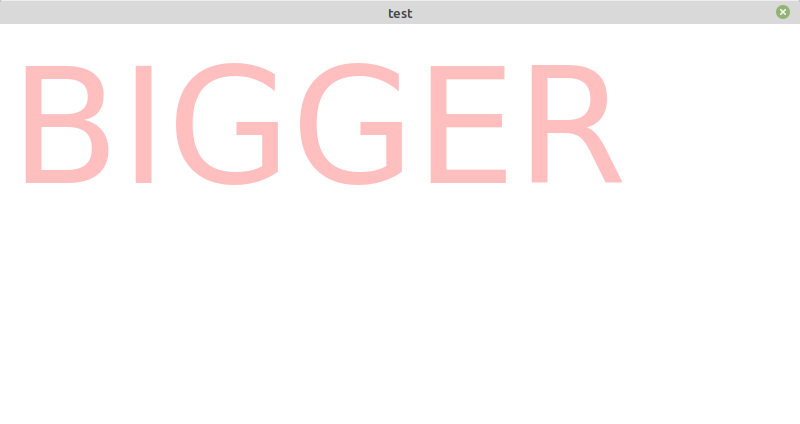
Code : Tout sélectionner
DrawShadowText("BIGGER", 10, 10, RGBA(255, 0, 0, 255), RGBA(255, 0, 0, 64), #VCP_MoveDown)
VectorFont(FontID(1))
DrawShadowText("smaller", 6, 6, RGBA(0, 0, 255, 128), RGBA(0, 0, 0, 32), #VCP_MoveToEnd)
DrawShadowText("12345", 4, 8, RGBA(0, 255, 0, 255), RGBA(0, 255, 0, 64), #VCP_MoveDown)
VectorFont(FontID(0), 24)
DrawShadowText("ABCDEF", 2, 4, RGBA(128, 0, 128, 255), RGBA(128, 0, 128, 128), #VCP_MoveDown)
StopVectorDrawing()Re: Comment faire un texte flou en VectorDrawing ?
C'est normale, Linux est Anti Ombre 
AMD Ryzen 9 5950X (16 cœurs, 32 threads, Socket AM4)
Gigabyte RTX 5090 WINDFORCE OC (32 Go GDDR7)
ASUS TUF GAMING B550-PRO (AM4, 4 slots RAM)
64 GB DDR4 3200 Mhz
Asus 24 Pouces: 1920 x 1080.
Système: Windows 10 64 Bits.
PureBasic: 6.30 beta 4 x64 Bits.
Gigabyte RTX 5090 WINDFORCE OC (32 Go GDDR7)
ASUS TUF GAMING B550-PRO (AM4, 4 slots RAM)
64 GB DDR4 3200 Mhz
Asus 24 Pouces: 1920 x 1080.
Système: Windows 10 64 Bits.
PureBasic: 6.30 beta 4 x64 Bits.